
1. Scalable architecture
OutSystems facilitates seamless scalability by offering both horizontal scalability and vertical scalability through flexible computing power for applications and databases. OutSystems employs load balancing to evenly distribute incoming traffic, ensuring consistent performance as applications scale.
Table of contents
- Horizontal scalability
- Vertical scalability
- ODC Resource Capacity Fair Use Limits
- Resource Capacity Sizes
- Load balancing
Horizontal scalability
For horizontal scalability (scale-out), OutSystems makes it easy to add additional nodes to any production environment. This helps in the following scenarios:
- High availability
- Increased user load with more users or more frequent usage
- Increased business logic complexity/load
- Increased volume of batch processing
- Increased data volume or number of transactions
Horizontal scaling with O11 is seamless. The platform automatically deploys additional front-end servers in a farm configuration and syncs the applications in the environment to the new front-end servers. All front-end servers in the farm will log to the same centralized repository for efficient monitoring and troubleshooting.
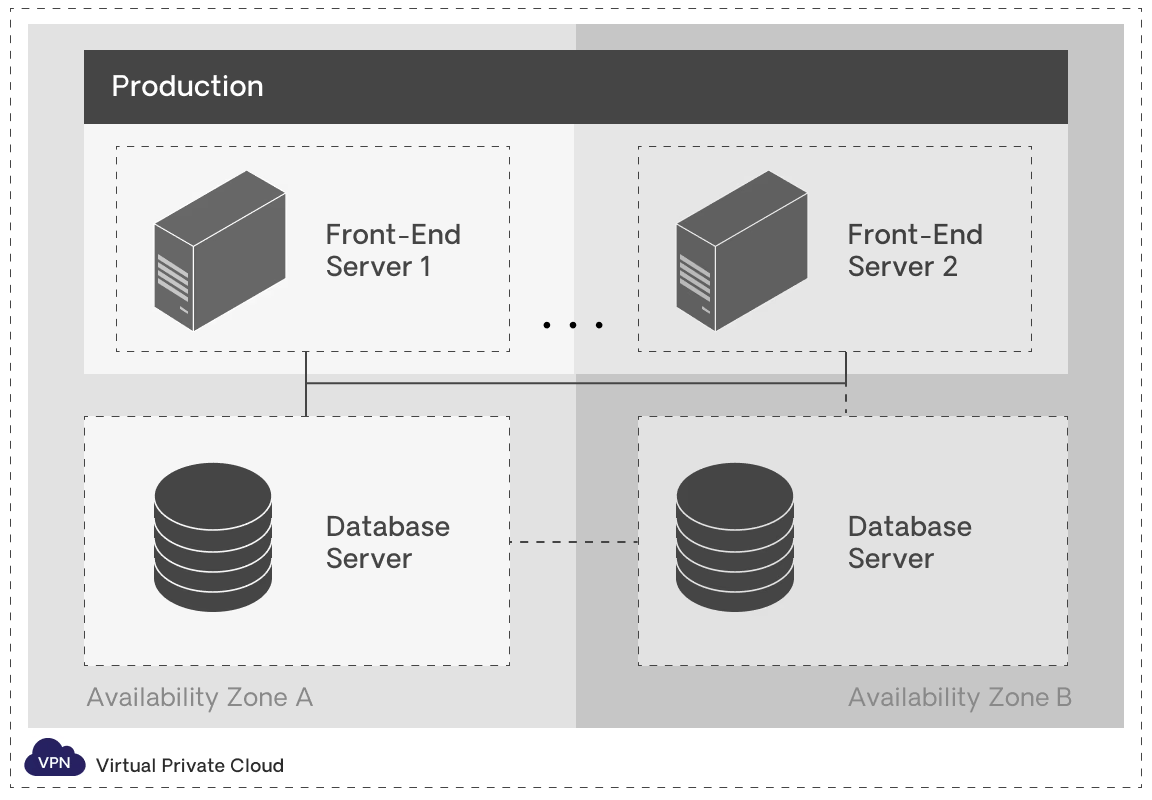
A team can add as many front-end servers as needed for unlimited horizontal scalability. With one click, OutSystems automatically synchronizes applications to the new front-end servers.
Once front-end servers are configured, OutSystems automatically deploys all applications to each server. No user data or session information is stored locally in a single server. This allows teams to distribute any user request to any of the servers, increasing the redundancy and availability of the system. All front-end servers in the farm will log to the same centralized repository for efficient monitoring and troubleshooting in the Service Center.
Horizontal scaling with ODC is automatic. Each application is deployed to individual instances called replicas. As application load increases, additional replicas are deployed to handle the incoming requests. and each application automatically scales horizontally independently, ensuring that each application replica has its own dedicated resources.
Traditionally, when building and managing distributed systems, developers are expected to follow best practices for development and assure minimal resources are consumed to always keep those resources free. Unfortunately, in these scenarios, a small mistake such as forgetting to close a reader can take a significant performance penalty.
To prevent these, OutSystems offers automatic prevention mechanisms to ensure efficient resource usage and reduce the risk of system issues as you scale. It automatically manages the closure of readers, connections, and transactions, as well as minimizes memory usage in all requests. This automation significantly reduces the likelihood of human-induced errors that could lead to system failures that affect scalability. Moreover, OutSystems simplifies the process of building highly scalable solutions, eliminating the need for expensive distributed systems and technical expertise in performance optimization.
Vertical scalability
OutSystems Cloud scales to meet the most demanding applications. For more information on this subject, please also see High availability and scalability strategies.
Vertical scaling is when additional resources are added to an existing node or database (more powerful CPUs and/or more memory). This helps:
- Deliver higher performance for your developers as they create and deploy apps.
- Support significant increases in end users of your applications.
- Enhance the processing power of the database as the number and complexity of your applications grow.
For vertical scalability (scale-up), OutSystems makes it easy to add additional database capacity to any production environment with O11. With ODC, vertical scaling of the database is on-demand, as the platform utilizes a process that automatically monitors the workload and adjusts the capacity as needed based on application demand.
ODC Resource Capacity Fair Use Limits
The following are the default resource sizes included with a valid subscription to OutSystems Developer Cloud, and apply to each stage individually (Development, Non-Production and Production). Thus, the ODC tenant, as a whole, has the same capacity across all stages:
| ODC Platform Edition | ||
|---|---|---|
| Resource | Description | |
| Compute Instances |
15 compute instances by default with ODC, without High Availability |
Total number of container instances that are available to be used for all applications, workflows, and timers in each stage |
|
Compute Instances |
The amount of extra capacity provided in each stage for each additional 150 AO pack purchased |
|
| Database Compute |
16 GB |
Amount of compute resources (memory/CPU) allocated to the database shared across all apps in each stage |
| Database Storage |
500 GB |
Amount of storage allocated to the database shared across all apps in each stage |
| Custom Code Execution Duration |
30,000 seconds/day |
The amount of time in seconds that all custom code functions in each stage can execute for per day |
| Agent Executions |
1,000 Agent |
The total number of Agent Executions available per month |
OutSystems also provides additional flexibility in scaling your stages by offering ODC Compute Add-Ons, which allow you to increase the available capacity for each Resource listed in the table above as needed. Please reach out to your account team for options and pricing.
Resource Capacity Sizes
The OutSystems O11 platform provides a wide selection of class sizes that are optimized to fit different use cases. Each class size is comprised of varying combinations of computing capacity that give you the flexibility to choose the appropriate level of capacity for your applications.
The following resource sizes are currently supported on OutSystems 11 Cloud:
| O11 Cloud Front-End Servers | |
|---|---|
|
Class 1 |
2 Virtual Cores |
|
Class 2 |
2 Virtual Cores |
|
Class 3 |
4 Virtual Cores |
|
Class 4 |
4 Virtual Cores |
|
Class 5* |
8 Virtual Cores |
|
Class 6* |
8 Virtual Cores |
|
Class 7* |
16 Virtual Cores |
|
Class 8* |
16 Virtual Cores |
|
Class 9* |
32 Virtual Cores |
| O11 Cloud Database Servers (SQL Server or Oracle) | |
|---|---|
|
Class 2 |
2 Virtual Cores |
|
Class 3 |
4 Virtual Cores |
|
Class 4 |
4 Virtual Cores |
|
Class 5* |
8 Virtual Cores |
|
Class 6* |
SQL Server: 16 Virtual Cores Oracle: 8 Virtual Cores |
|
Class 7* |
SQL Server: 32 Virtual Cores Oracle: 16 Virtual Cores |
|
Class 8* |
SQL Server: 96 Virtual Cores Oracle: N/A |
* These classes always require an additional ongoing subscription fee.
Upgrades up to Class 4 databases and front-end servers are complimentary for almost all customers (those under licensing models from 2020 forward), when needed and upon request through OutSystems Support. Downgrades are performed when the same level of resources is no longer needed. In the rare instance where a database or front-end server upgrade is needed to Class 5 or above, an additional ongoing subscription fee is required.
In an on-premises installation of OutSystems, you have the flexibility to scale the computing resources as you prefer, since you procure these resources.
Load balancing
A load balancer automatically distributes incoming application traffic across multiple front-end servers to spread the request load. It also detects unhealthy front-end servers in the production environment and automatically reroutes traffic to healthy instances until health is restored, increasing the fault tolerance of all applications so that scalability isn’t affected.
OutSystems stores mobile and web user sessions in the session database, allowing multiple requests from the same user to be handled by any front-end server in a farm environment, which also supports scalability. The session database elements are configured on a dedicated database schema for consistent performance and operations. OutSystems uses the native session management services of the application server stack.