15
Views
15
Comments
Unable to clear the Date Picker value in a Reactive app

Hi All,

I am using interaction date picker, shown below


I am not able to clear the date, selecting the date and trying to clear it but its not working.

Can anyone suggest some solution for this?


Thanks in Advance!


2025-11-19 06-14-01
Miguel Verdasca

Hi Shivangi,

This behaviour is expected in Reactive apps because the Date Picker does not allow clearing the value unless the underlying variable can hold an empty date and you explicitly reset it.

Here are the steps to fix it:

  1. Make sure the variable bound to the Date Picker starts as NullDate(). If the variable has any default value (for example CurrDate()), the Date Picker will not clear.

  2. The Date Picker does not include a built-in clear option, so you need to manually reset the value. Add a small button or trigger an action where you set: InitialTrainingDate = NullDate()

  3. If the input is marked as Mandatory, it will also prevent clearing. Set Mandatory to False if you want the field to be allowed to stay empty.

Let's sum-up:

  • Initialise the variable with NullDate().

  • Reset the variable to NullDate() when you want to clear the field.

  • Remove Mandatory if needed.


2019-03-12 12-28-20
Shivangi Thakur

Thank you for your response.

This issue occurs when the user edits the date field, so the field already contains a value.

I also attempted to clear the value explicitly in the OnChange event of the input widget using DatePicker_Clear, but I’m unable to pass the widget’s ID to the action. The Date Picker is inside a List, and when I try to reference the widget ID, the elements inside the List are not available for selection.


2025-11-19 06-14-01
Miguel Verdasca

Hi Shivangi,

Thanks for the clarification. Since the Date Picker is inside a List, you cannot directly reference the widget ID in your action (this is expected in Reactive apps). Also, calling DatePicker_Clear will not work because the Date Picker component replaces the input element at runtime.

To reliably clear the value when the user edits the field, you can use the following approach:

  1. Handle everything at the data level, not at the widget level. Instead of trying to clear the visual input, simply assign:

    InitialTrainingDate = NullDate()

    This will clear the field on the next screen refresh, regardless of the List context.

  2. If you want the change to happen immediately while inside a List, ensure the input is bound to the List item’s attribute, for example:

    ListItem.EventDate = NullDate()

    When the screen re-renders, the Date Picker will receive the new empty value.

  3. You do not need to reference the widget ID. In Reactive apps, the UI always reflects the variable’s value, so controlling the variable is all you need. The Date Picker will automatically update once its bound variable becomes NullDate().


2019-03-12 12-28-20
Shivangi Thakur

Thanks for replying so fast, I will try to follow the solution you gave.

2024-12-11 04-34-39
Peter Hieu

Hi @Shivangi Thakur 

You can’t call DatePicker_Clear inside a List because widget IDs are not exposed for items rendered in a ListRecords/ForEach. The solution is to wrap the Date Picker in a Web Block, bind it to a local variable, and expose a ClearDate client action. Then, inside the List, call MyBlock.ClearDate() directly — no widget ID needed. 

Hope this helps,

Peter Hieu.

2023-10-16 05-50-48
Shingo Lam

Its correct approach, nice job @Peter Hieu 

2019-03-12 12-28-20
Shivangi Thakur

Hi,

I will try this approach. Meanwhile if you can share oml, it would be helpful.


Thanks

Shivangi

2024-12-11 04-34-39
Peter Hieu
RunSample.oml
2024-12-11 04-34-39
Peter Hieu

The solution mentioned by @Mihai Melencu is completely correct for your case. I also added a sample where the Date Picker is used inside a List, similar to the scenario you described. 

RunSample.oml
2025-03-01 14-31-55
Mihai Melencu

Hi,

I’m not sure what your exact use-case or clearing rule is, but I created a small sample that demonstrates how you can retrieve DatePicker widget IDs inside a list.

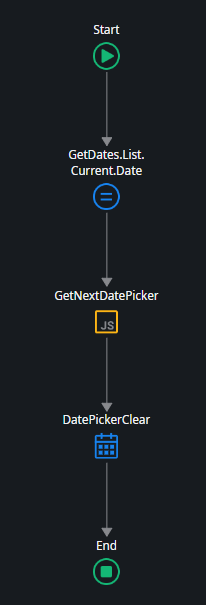
In the sample, the rule is simple: whenever a DatePicker is edited, the next DatePicker in the list is automatically cleared. For example, editing DatePicker 1 clears DatePicker 2.

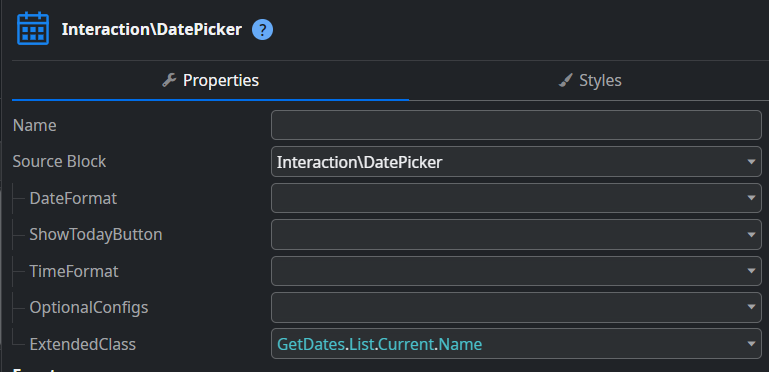
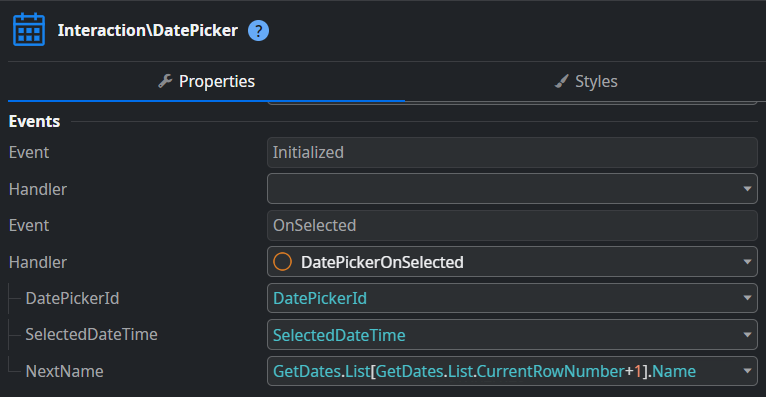
To achieve this, I created a structure containing Name and Date. In the DatePicker’s extended properties, I assigned a CSS class based on the current item’s Name. Then, in the DatePicker’s OnSelected event, I added an input parameter containing the next date’s name. Using a small JavaScript snippet, I locate the next DatePicker widget in the DOM and clear its value.
Javascript I used:

  • const inner = document.querySelector('.osui-datepicker.Date2');
  • const widget = inner ? inner.closest('[data-block="Interaction.DatePicker"]') : null;
  • $parameters.WidgetId = widget ? widget.id : "";


I attached a sample OML for reference.

DatepickerSampleList.oml
2019-03-12 12-28-20
Shivangi Thakur

Thanks for sharing the OML. My main goal was to clear the date in the input field. I tried using the Date Picker’s clear action, but since the widget is inside a list, I couldn’t retrieve its widget ID. I also noticed that in your OML, the date can’t be cleared either. 

2025-03-01 14-31-55
Mihai Melencu

What would trigger the clearing action? And when you say “clean,” do you mean setting the variable to null and also clearing the DatePicker value?

It would also be helpful if you could share a sample OML that reflects your exact use case.

2019-03-12 12-28-20
Shivangi Thakur

Like you see in below image , I selected the date and directly pressing backspace button in keyboard, but its not getting cleared up.

2025-03-01 14-31-55
Mihai Melencu

Thank you for the explanation, now I get the use-case.

In this case you will need to use the OnInitialize event of the Datepicker and a javascript to bind the clear action to the key event when user presses backspace. This is the JS snippet:


  1. var widget = document.getElementById($parameters.DatePickerId);
  2. if (!widget) {
  3.     return;
  4. }

  5. var dp = widget.querySelector('.osui-datepicker');
  6. if (!dp) {
  7.     return;
  8. }

  9. var input = dp.querySelector('input[type="text"]');
  10. if (!input) {
  11.     return;
  12. }

  13. input.addEventListener('keydown', function (e) {
  14.     if (e.key === 'Backspace') {
  15.         if (window.OutSystems &&
  16.             OutSystems.OSUI &&
  17.             OutSystems.OSUI.Patterns &&
  18.             OutSystems.OSUI.Patterns.DatePickerAPI &&
  19.             typeof OutSystems.OSUI.Patterns.DatePickerAPI.Clear === 'function') {

  20.             OutSystems.OSUI.Patterns.DatePickerAPI.Clear($parameters.DatePickerId);
  21.         }
  22.         e.preventDefault();
  23.     }
  24. });
DatepickerSampleList.oml
2019-03-12 12-28-20
Shivangi Thakur

Hi,

Thank you so much for providing the solution. I will implement the same way and let you know if i need any further help.

Thanks again !


Community GuidelinesBe kind and respectful, give credit to the original source of content, and search for duplicates before posting.