Developing with OutSystems

Today's modern applications often need to handle file uploads, and sometimes, those files are massive. When we're talking about large or multiple files, this seemingly straightforward task can quickly turn into a headache for developers and a frustrating experience for users. But don't you worry! At OutSystems, we're all about empowering you to build scalable, high-performing applications that tackle these challenges head-on.
In this blog, we dive into how developers can implement a robust and elegant solution for multi-file uploads within OutSystems applications by strategically leveraging Web Workers, a powerful web standard for web content to run scripts in background threads. You'll see how this approach dramatically boosts performance and user experience, delivering clear benefits for technical teams, businesses, and, most importantly, your customers.
Table of contents:
- The challenge: When standard file uploads just aren't enough
- Unresponsive user interface
- The solution: Unleashing performance with Web Workers
- Multi-file uploads with OutSystems and Web Workers: A technical deep dive
- Server-side and security considerations
- Benefits for all stakeholders
- Is the default OutSystems file uploader obsolete? Not so fast!
- Wrap-up
- SimpleUploadWorker: A starting point for worker communication
The challenge: When standard file uploads just aren't enough
OutSystems provides an incredibly rich set of tools to build scalable applications. However, even with all those capabilities, certain use cases, especially those involving heavy file uploads, can highlight the natural limitations of standard web technology, particularly in Reactive Web applications.
The core issue lies in how web applications typically execute code: almost everything runs on the main thread. This main thread is like the application's central nervous system, responsible for most JavaScript execution and all interactions with the Document Object Model (DOM). When this thread gets bogged down with heavy tasks, like processing large files, it struggles to keep up, leading to a sluggish or even completely unresponsive user interface.
Let's look at some common problems you might encounter when uploading large files using conventional methods.
Performance bottlenecks and timeouts
The default timeout for OutSystems server actions is often around 10 seconds, but it can be increased. For large files or slow connections, this might not be enough, leading to frustrating timeouts. Handling significant binary data directly on the main thread also consumes substantial memory, impacting overall application performance.
Memory overload
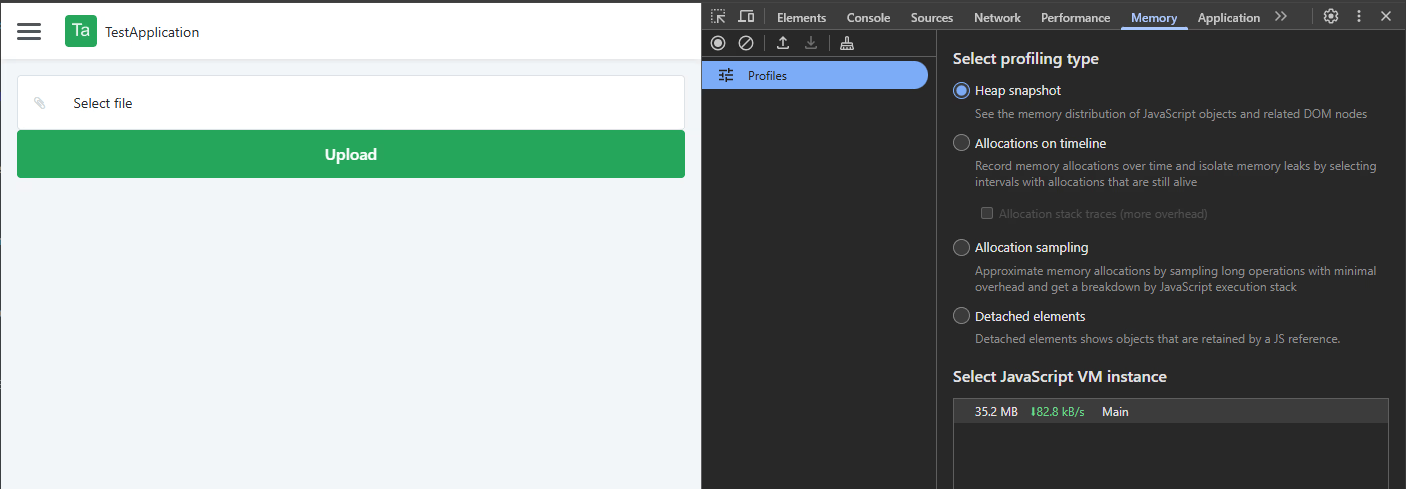
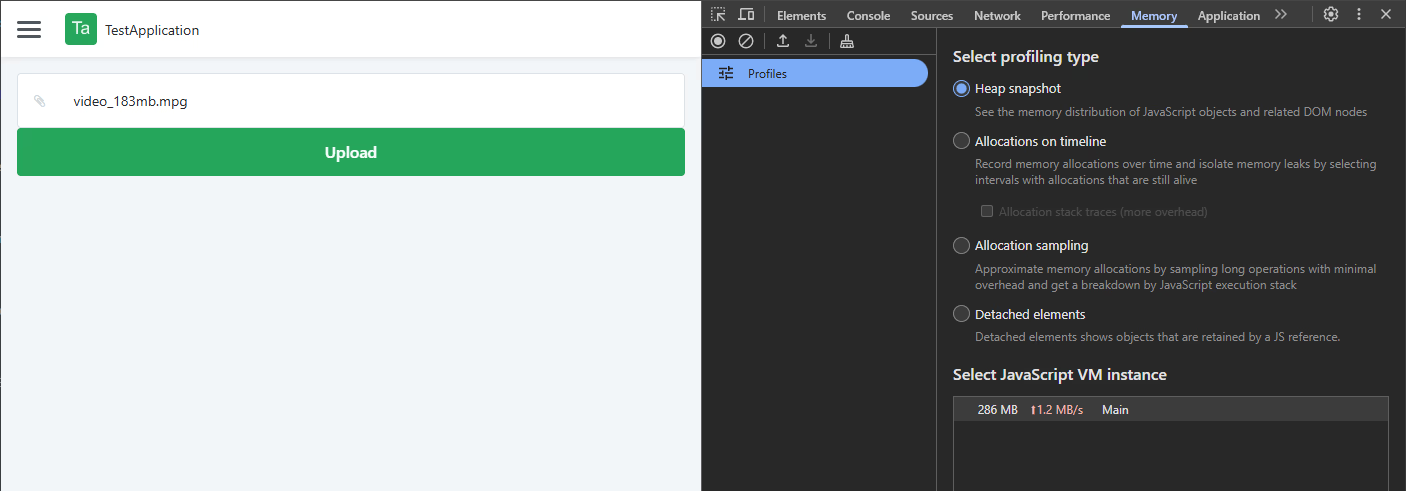
Storing huge file content (imagine a 1GB file!) as massive binary values in the main thread is a bad practice. It quickly clutters memory, slowing everything down. The example clearly shows how memory allocation can skyrocket after a file selection, going from 35.2 MB to 286 MB.
Unresponsive user interface
If the entire file processing happens on the main thread, your application's UI can freeze up, creating a terrible user experience. Even if you try to chunk the file on the main thread, the UI can still feel sluggish, and managing all those individual chunk requests becomes overly complex.
The solution: Unleashing performance with Web Workers
This is where Web Workers burst onto the scene as a powerful solution! Think of a Web Worker as a dedicated sidekick, a separate thread that can take on heavy tasks, freeing up your main thread to keep the UI smooth and responsive. Unlike the main thread, a worker thread doesn't directly access the DOM, but it can communicate with the main thread by sending messages back and forth.
How it works in OutSystems (and the browser):
- Initialization: When you need a worker, JavaScript on the main thread instantiates it using its constructor.
- Resource allocation: The browser then chats with the operating system (OS) to get the necessary resources for this brand-new worker.
- Dedicated execution: The OS, acting as a low-level manager, creates the new thread, allocates its resources, and schedules it to run on a CPU core.
- Fluid UI: This ingenious process lets the worker handle all the heavy lifting in the background, ensuring your main thread stays free, and your application's UI remains fluid and interactive.
Web Workers are fantastic for various background tasks, including system notifications (with Service Workers), data prefetching, offline data synchronization, and, crucially for us, background uploads.
Multi-file uploads with OutSystems and Web Workers: A technical deep dive
OutSystems allows us to implement a multi-file uploader using worker threads, ensuring files, even massive ones, are handled efficiently without sacrificing user experience. The core strategy here is chunking the file and uploading these chunks in the background.
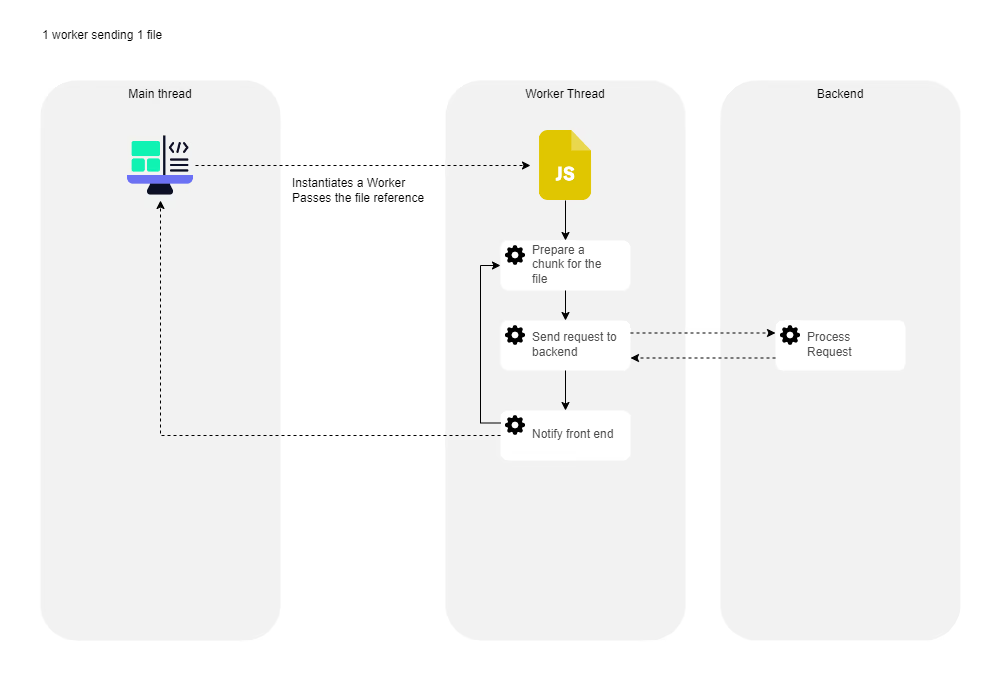
- Sending the file reference: Instead of loading the entire file into memory (which, as we've seen, is a bad idea), your application gets a reference to the file. You can do this using browser features like window.showOpenFilePicker or by capturing the file using event.dataTransfer for drag-and-drop actions. This reference then goes straight to the web worker. The worker takes charge of the actual upload, leaving your main thread free for other important stuff.
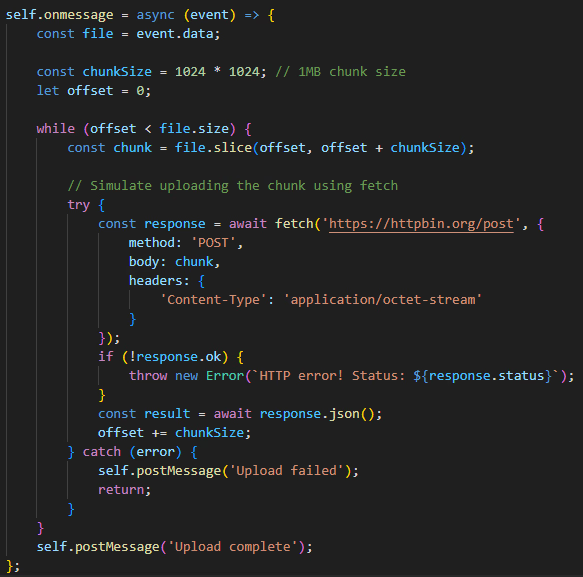
- Worker-side chunking and upload: Once the worker has that file reference, it takes on the heavy responsibility of slicing the file into smaller, manageable pieces – let's say 1MB chunks. Each of these chunks then gets sent to the server independently.
- Concurrency and speed: Here's a neat trick: you can leverage concurrency. This means you can have more than one worker sending files, or even use a pool of workers to upload a single large file much faster. Imagine a pool of 10 workers tackling a 10MB file; that could result in an almost instantaneous upload!
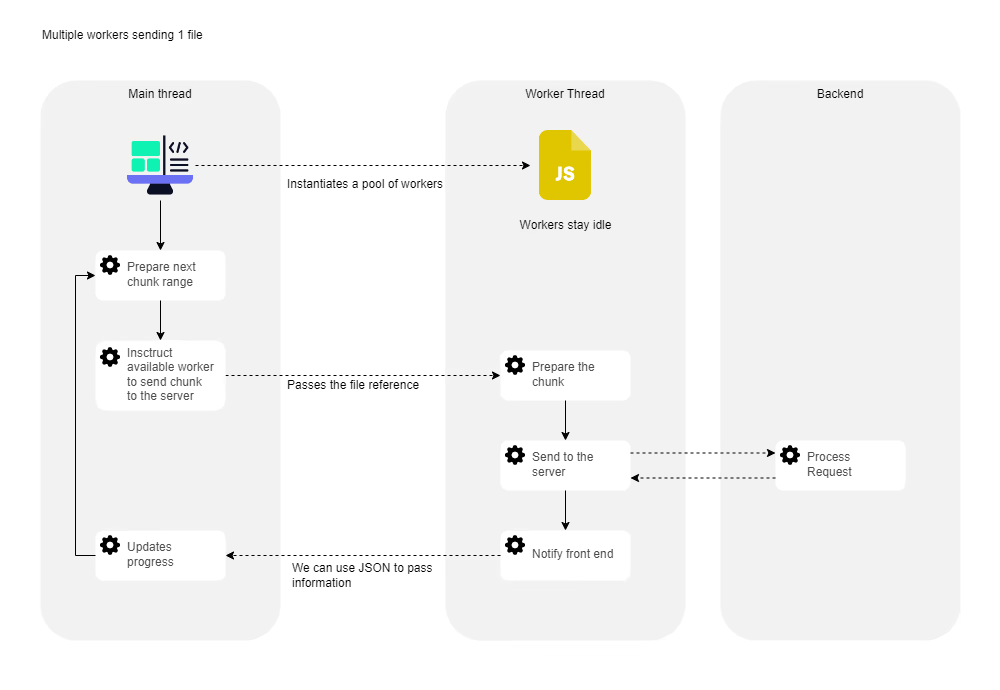
- Real-time progress and communication: The main thread and the worker communicate. As the worker processes and uploads chunks, it can send messages back to the main thread. This lets your UI update the upload progress in real-time, keeping users informed and happy.
- Memory efficiency: One of the biggest wins! Only the current slice (chunk) being uploaded is temporarily stored in memory by the worker. This dramatically reduces memory consumption compared to keeping the entire file in the main thread.
Let's peek at some simplified code to illustrate this flow.
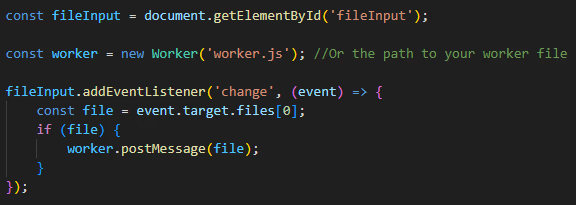
Client-side (main thread) – Getting the file
First, we need a custom HTML element. This is needed to create a reference to the file. This won't load the file into memory.

Then, we need to access the file reference so we can pass it to the web worker when we instantiate it. The file reference is passed to the worker, and as it is a reference, it won't keep the file in memory. This code runs when a file is selected. In this example, we are passing the file ref to the worker.
Worker-side (worker thread) – Chunking and uploading
The worker handles the actual upload of the file. It will iterate through the slices of the file and upload them one by one. Only the current slice that is being uploaded is temporarily stored in memory until the next iteration.
Testing the performance gain
For this scenario, we implemented a dedicated worker pool of 16 threads to handle the file upload. The main thread manages the queue, allocating chunks to the workers and assigning a new chunk to a worker as soon as it sends a message back indicating completion. This setup means we achieved true concurrency, with 16 chunks being uploaded simultaneously.
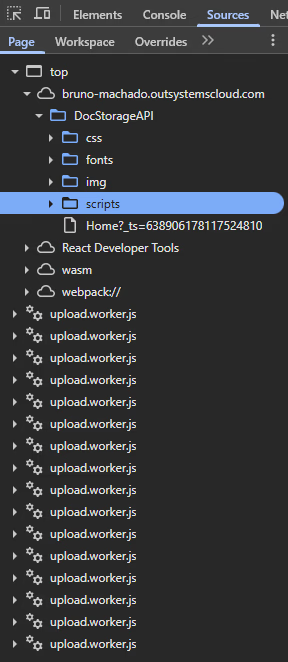
The results speak for themselves:
- File size: 183 MB
- Total upload time: 17 seconds
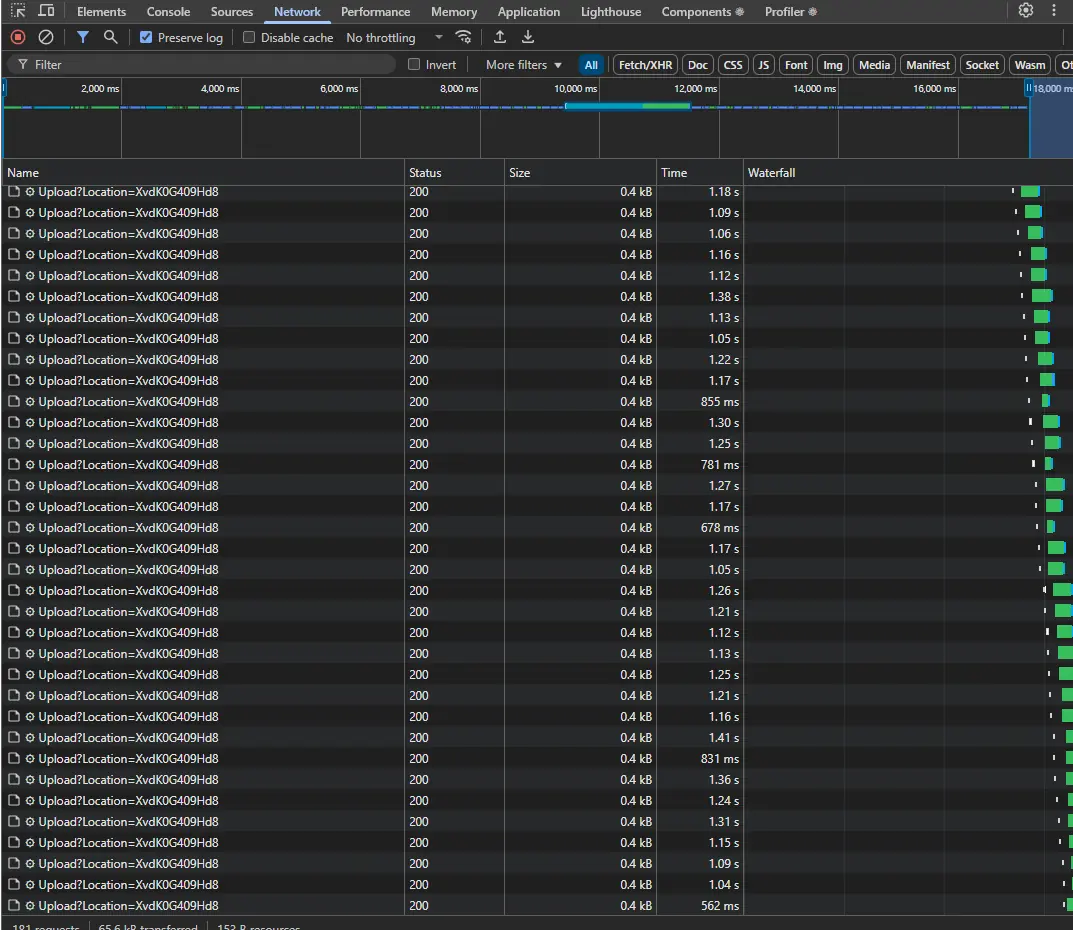
While each individual worker took between 0.5 and 1.3 seconds to upload its chunk, the power of concurrency delivered this impressive speed.
Comparing the traditional approach
Now, let's compare this to a regular, conventional file upload that relies solely on the main thread. We immediately encountered a server-side configuration restriction. The server's settings limit the maximum size of files accepted through the standard upload mechanism, preventing us from using the full 183 MB file for the comparison.
This forced us to use a much smaller file for the test: 74 MB (less than half the size used with Web workers).

The result shows the extreme bottleneck of the standard approach, even with a smaller file: The upload took 26 seconds.
This comparison clearly demonstrates how Web Workers drastically reduce upload time and overcome the memory and timeout issues associated with handling large files on the main thread.
Server-side and security considerations
Adopting this smart upload strategy requires a bit of thought for your backend.
API for chunks
Your OutSystems backend will need an API endpoint (or a set of actions) specifically designed to accept and process these file chunks.
Storage strategy
For very large files, storing the chunks, and eventually the merged file, in a file system is generally preferable than in a database. After all chunks are received, a binary data concatenation can then be used to merge them into the complete file. Many cloud vendors, like Google Cloud Storage and AWS S3, offer robust support for chunked and resumable uploads, which pair perfectly with this strategy.
Security is key
When leading with API calls, server-side security is absolutely paramount. You can leverage JSON Web Tokens (JWTs) to guarantee that the user performing the upload is authorized. OutSystems natively handles security for reactive application requests. When your web worker makes API requests, you can include a request token, like a session token, to maintain that crucial security layer. Also, validations upon file receival, like permissions for upload, file size, and allowed formats result in more robust security. Although this can be validated upfront on the client side, we must consider that the code can be tampered with and those validations can be bypassed easily.
Benefits for all stakeholders
Implementing multi-file uploads with OutSystems and Web Workers isn't just a technical win; it delivers tangible benefits across the entire organization.
For technical teams
- Enhanced performance and scalability: Offload heavy tasks, ensuring the main thread remains free and responsive. This allows you to build highly scalable applications, even with intensive I/O operations.
- Maintainable architecture: Separating UI operations (main thread) from background processing (worker thread) leads to cleaner, more modular, and easier-to-maintain code.
- Leveraging modern web capabilities: OutSystems empowers developers to harness advanced web features like Web Workers, solving complex problems with elegance and efficiency.
For businesses
- Improved operational efficiency: Faster, more reliable file uploads mean quicker data processing, smoother workflows, and less time wasted waiting for uploads to complete.
- Robust applications: Your applications become more resilient to large data loads, drastically reducing the risk of frustrating timeouts and errors.
- Future-proofing: The ability to effortlessly handle increasingly larger files supports business growth and evolving data requirements, keeping your applications relevant and powerful.
For customers/end-users
- Seamless user experience: Say goodbye to frozen screens and unresponsive interfaces during large uploads! The UI remains fluid and interactive, making for a much happier user.
- Faster uploads: With background processing and concurrency, files are uploaded more quickly and reliably.
- Reliability: Reduced chances of upload failures due to timeouts or memory issues, leading to greater satisfaction and trust in your application.
Is the default OutSystems file uploader obsolete? Not so fast!
While our discussion highlights the limitations of the default OutSystems file upload widget when dealing with big files, it is crucial to recognize that the standard uploader is not obsolete. For specific use cases, it remains the fastest and simplest option to implement.
If the file you need to upload is small—like changing a profile picture, for example—the request processes quickly with no significant performance issues. The simplicity of the default widget makes it an efficient solution in these scenarios.
Even when using the default uploader, however, developers can implement immediate best practices to prevent the common server timeout and memory issues often associated with slightly heavier loads:
- Validate size upfront: When the user selects the file, validate its size immediately. This proactive step prevents the application from initiating an upload that is guaranteed to hit the default 10-second server action timeout.
- Clear memory post-upload: After the file successfully uploads, ensure you explicitly clear the variable that holds the binary file content. Since storing huge binary values in the main thread is a big disadvantage that clutters memory and impacts performance, releasing that memory is vital for maintaining a responsive user interface.
The necessity for advanced solutions, like leveraging the worker thread, only truly arises when we move beyond these light use cases and must upload massive files.
Wrap-up
OutSystems consistently empowers development teams to build highly scalable and performant web applications that overcome common web technology limitations. By strategically integrating Web Workers for multi-file uploads, we not only solve a critical performance challenge but also elevate the user experience and provide a robust foundation for handling large data volumes efficiently.
This approach truly highlights OutSystems' commitment to delivering powerful, modern solutions that meet the demanding needs of enterprise applications today and tomorrow.
SimpleUploadWorker: A starting point for worker communication
Are you ready to dive into Web Workers? We've set up a foundational component that serves as the perfect starting point for understanding asynchronous processing in the browser.
This component handles the entire process of uploading a single file using a dedicated Web Worker.
The benefit
It clearly demonstrates how to offload intensive work (the file upload) from the main thread, keeping your user interface fast and responsive.
The feedback loop
Crucially, it shows the efficient communication pattern needed for a great user experience: the worker reports the upload status percentage back to the main thread in real-time, allowing for a smooth and accurate progress indicator.
Your next step: Evolve the component
From this solid foundation, you can choose how to evolve the architecture:
- Multiple files: Extend the solution to upload multiple files, instantiating a new worker for each simultaneous upload.
- Parallel chunks: Leverage the existing logic to divide a single large file into chunks, and allocate each chunk to a separate worker for true parallel upload speed.