OutSystems Agent Workbench
Imagine heading into every customer meeting fully briefed, armed with summaries of prior conversations, relevant sales data, and the perfect follow-up strategy. No frantic last-minute prep, no digging through emails. Instead, total clarity. That’s exactly what I wanted, and that’s what I built by blending agentic AI with OutSystems.
In a recent project, I combined OutSystems and agentic AI to build an intelligent meeting assistant. I’m not talking about another chatbot, This is a true workflow-driven AI solution to help make sense of my chaotic calendar.

Using Mentor to build v1.0 in seconds
I started by giving OutSystems Mentor a simple prompt: build an app to manage my calendar that includes meetings and participants. In seconds, I had a working application that I could now make my own.
The next step was to tweak the generated app using AI! With Mentor I was able, to quickly add all the things I forgot to include in the original prompt and have the first version of the application running.
Classifying Google Calendar meetings
To pull in real calendar data, I connected the app to Google Calendar using a service account and OAuth 2.0. After setting the proper permissions and generating tokens, I could fetch upcoming events and store them in my OutSystems application database.
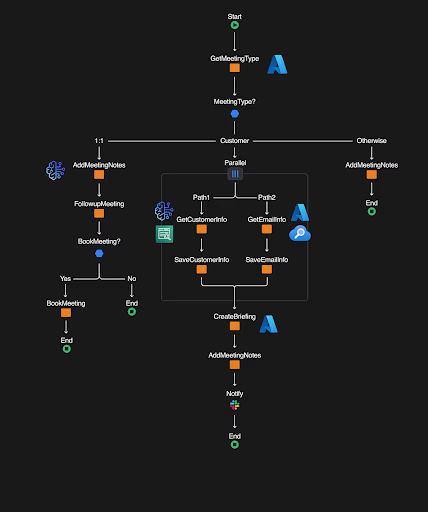
Next, I tapped into the AI Agent Builder and built an agent using GPT-4. This agent's role was to classify a meeting (internal, 1:1, or customer) and, in the case of a customer meeting, extract its name. To facilitate auditing, I asked the agent to explain why it made each classification. That kind of transparency makes debugging and fine-tuning so much easier.
Automatic follow-ups and smart briefings
The cool thing about agentic AI is that it can take action on your behalf. For this scenario, I asked AI to decide if and when I should schedule follow-ups in the case of 1:1 meetings.
For customer meetings, what I need is to be briefed on the customer details and all interactions we had together. Once a customer meeting is detected, the system shifts into high gear:
- It pulls relevant email threads from Amazon Simple Storage Service (S3) and summarizes them using Amazon Kendra.
- It queries Azure AI Search for Salesforce data in the account stored on Blob Storage.
- It combines everything into a concise, actionable meeting brief using GPT-4.
After all of this is done, I get a two-paragraph message in Slack, ensuring I’m fully prepared by the time that Zoom call starts.
Workflow-driven AI: The game-changer
OutSystems' visual workflow builder is where everything came together. I could define every decision point, every fallback, and see exactly what was happening while AI was doing its magic. No black-box AI behavior. Just traceable, auditable automation.
A thousand ways to improve agentic AI applications
A great side effect of using low-code to build agentic AI applications this quickly is that you immediately start thinking of one thousand improvements you can implement. And because everything is modular and managed with a workflow, you see iteration leading to innovation in a fast and safe way!
What would you add to this application? What can agentic AI do to help you take control of your schedule?
Want to see exactly how I did it? Watch the full walkthrough on the OutSystems YouTube channel.