Application Data Management

How many dashboards have you done? I’ve done a lot, and the many different ways to capture the data and show it in beautiful dashboards are always interesting. And the data is part of the “beautiful.” If you have no data, charts might not show, and counters might show meager results. Knowing how many cars you rent in a country might be boring, but showing the car that sells best per region of the country might be just the information your Sales team needs to make crucial decisions!
Performant and informative dashboards are the face of your application. So, getting data is essential for a good dashboard and that’s why I’m sharing some tips and tricks for your SQL queries.

Use Distinct vs. Distinct ON
I have used Distinct many times, but I only recently found Distinct ON.
Both are used to eliminate duplicates, but they serve different purposes:
- DISTINCT removes duplicate rows across all selected columns entirely.
- DISTINCT ON lets you pick the first row for each value of a specific column or set of columns—but you must pair it with ORDER BY to control which row gets chosen. It works very well to get the top selection based on the ORDER BY.
DISTINCT ON ends up being very useful for getting the latest or “top” something of subsets in your queries.
Window functions are your analytics friends
Window functions are one of the most powerful features in SQL, allowing you to perform calculations across a set of table rows that are somehow related to the current row. Unlike regular aggregate functions, window functions don’t collapse rows. Instead, they add extra information per row, so they are ideal for analytics and advanced reporting.
Many of these window functions rely on a Partition By clause, which is used to divide the result set into groups (or "partitions") before performing the calculation. It works like a GROUP BY, but instead of collapsing rows, it allows you to compute values across rows in each partition while preserving the full detail of the dataset.
Let me share some common examples of windows functions:
LAG(): Peek at the previous row
The LAG() function lets you look at a previous row’s value without a self-join or subquery. It’s useful for calculating differences or detecting changes between rows. Want to know this month's sales and compare it with last month's results? This is the function for you.
ROW_NUMBER(): Unique row index in a partition
ROW_NUMBER() assigns a unique sequential number to each row in a partition (or the entire dataset). If you need to identify the “first” record per group, this is your friend. You’ll get similar results to using Distinct ON with Order By.
RANK() and DENSE_RANK(): Ranking with gaps and no gaps
The RANK() and DENSE_RANK() functions are Order By clauses on steroids. You can rank information in groups and explicitly show the row’s rank, which is good for filtering information or even showing it. Both functions give the same number to ties in the rank, with the difference that the RANK() maintains the numbering after the tie while Dense_Rank() skips.
SQL queries for external entities in ODC
You might be asking yourself, “Why do I need this? I’ll just use aggregates and low code to get the information!”
And you are right, but you can also do advanced queries, and even better, you can use the exciting feature of SQL queries for external entities in OutSystems Developer Cloud (ODC)! This allows you to query any external database you have configured in your environment using SQL . You can query your Salesforce connection with your SAP Postgres external database! All this in the same query. Pretty impressive, I must say!
There are some tricks to it, because not all functions are supported, but I found myself using queries of this complexity without any issue:
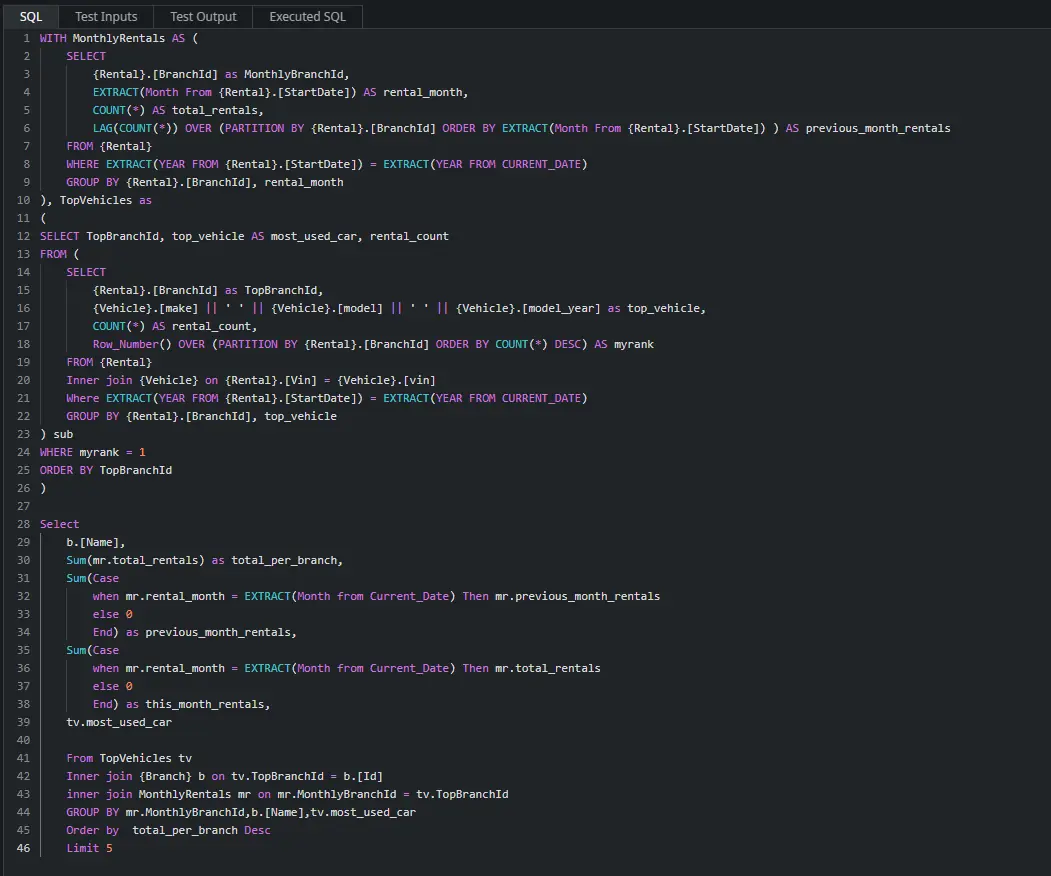
The engine to process these queries sits on top of Ansi92. Although you might have to convert one part of the query or another to be readable by the Advance Query node, I found that it was very easy, especially when “vibe coding” with our AI friends to convert the queries.
Eager for more?
You can find these tips and others in this YouTube video where I take you through the queries for a car rental dashboard built in OutSystems, with the data provided from an Aurora PostGres database.